.png)

The best solutions for automated document processing combine OCR, machine learning, and AI-based data extraction to convert unstructured documents — invoices, contracts, forms, and reports — into structured, machine-readable data without manual intervention. Four categories of solutions dominate enterprise deployments: developer-focused SDK/API platforms, cloud-native API services, legacy IDP platforms, and no-code workflow tools. The right choice depends on deployment requirements, AI model flexibility, and data sovereignty obligations. According to Fortune Business Insights, the global intelligent document processing (IDP) market is projected to reach $14.16 billion in 2026 and $91.02 billion by 2034, at a CAGR of 26.2% — reflecting both the scale of the problem and the urgency to solve it.
How Automated Document Processing Works
A production-grade IDP system operates across five technical layers, each responsible for a distinct stage of document transformation.
Document ingestion accepts inputs across formats — PDF, TIFF, Word, email attachments — and normalizes them for downstream processing. Layout-aware OCR converts document images into machine-readable text while preserving spatial relationships between fields, headers, and tables. AI-based field extraction applies trained machine learning models or LLM prompting to identify and pull specific data points — vendor name, invoice total, contract clause, patient ID — regardless of layout variation. Validation compares extracted values against business rules or reference databases to flag exceptions before data enters downstream systems. Workflow routing passes structured output to ERP, CRM, or RPA platforms via REST API or webhook, completing the transformation from raw document to actionable enterprise data.
According to the AIIM Market Momentum Index: IDP Survey 2025 — a survey of 600+ enterprises across the United States, Germany, Austria, and Switzerland — 78% of companies now use AI for document processing. Yet 61% of IDP workflows still include paper documents, indicating that automation penetration remains uneven and efficiency gains remain available at scale.
Key Criteria for Evaluating Automated Document Processing Solutions
The AIIM Market Momentum Index: IDP Survey 2025 identifies data security as the top implementation challenge, with 66% of new IDP deployments planned to replace existing systems rather than expand capacity. Before selecting a solution, enterprises should assess five dimensions:
Extraction accuracy across document types. Accuracy on structured documents differs significantly from performance on unstructured types like contracts or handwritten forms — the latter requiring stronger NLP and LLM integration to handle variable structure.
Deployment flexibility. Regulated organizations in banking, healthcare, and government increasingly require self-hosted or on-premise deployment to satisfy data residency and sovereignty requirements. Cloud-only architectures are a disqualifying constraint for these segments, regardless of other capabilities.
Integration depth. The ability to connect extracted data to ERP platforms (SAP, Oracle), CRM systems (Salesforce), and RPA tools (UiPath, Microsoft Power Automate) determines whether an IDP solution functions as a core workflow layer or an isolated tool. API-first architectures with cross-platform developer SDKs offer the greatest long-term flexibility.
Compliance and security certifications. Enterprise deployments require, at minimum, ISO 27001 certification and architecture designed to support GDPR and HIPAA compliance. Role-based access control (RBAC), AES-256 encryption, dynamic watermarking, and audit logging vary meaningfully across vendors and deployment models.
Total cost of ownership. Per-page, subscription, and perpetual license pricing models produce very different cost curves at high document volumes. Self-hosted or perpetual license options typically reduce TCO for organizations processing millions of documents annually compared to consumption-based cloud pricing.
Automated Document Processing Solutions Compared
The market divides into four structural categories, each with distinct trade-offs for enterprise buyers. The table below compares ComPDF — KDAN’s developer-focused IDP solution — against the three predominant vendor types.
| Evaluation Criteria | ComPDF (KDAN) | Cloud-Native API Providers | Legacy IDP Platforms | No-Code Automation Tools |
|---|---|---|---|---|
| Deployment options | Cloud, self-hosted, on-premise | Cloud only | Cloud / on-premise | Cloud only |
| Integration method | SDK + REST API + Docker | API only | Platform UI + connectors | Visual workflow builder |
| AI model compatibility | GPT-4o, Gemini, Deepseek, Qwen, Llama | Proprietary AI only | Proprietary AI | Limited third-party |
| Developer flexibility | High — cross-platform SDK (Web, iOS, Android, Windows, Mac) | Medium — API-first | Low — platform lock-in | Low — no-code only |
| Data sovereignty | ✅ Full self-hosted deployment available | ❌ Vendor cloud processing | ⚠️ Partial | ❌ SaaS-dependent |
| Compliance certifications | ISO 27001, GDPR-ready | SOC 2, HIPAA | ISO 27001, GDPR | SOC 2 |
| Licensing model | Perpetual / subscription / technology licensing | Pay-per-use | Annual subscription | Subscription |
| Best fit | AI workflow embedding, data sovereignty requirements | Rapid prototyping, cloud-native stacks | Large enterprise legacy process modernization | SMB lightweight automation |
Cloud-native API providers offer fast time-to-integration and minimal infrastructure overhead, but all document data must pass through the vendor’s cloud environment — a disqualifying factor for organizations under data residency regulations or handling sensitive customer records.
Legacy IDP platforms carry proven track records in structured back-office processing, but implementation timelines of three to six months, deep platform dependencies, and high switching costs limit flexibility for organizations scaling across document types or geographies.
No-code automation tools lower the barrier to entry for simple routing and form extraction, but their AI extraction capabilities are insufficient for complex unstructured document types — contracts, medical records, multilingual customs declarations — that require semantic understanding.
ComPDF is designed for organizations embedding document automation directly into existing enterprise systems through SDK or API, with optional self-hosted deployment for compliance-sensitive environments. Compatibility with multiple LLMs — GPT-4o, Gemini 1.5 Pro, Deepseek, Qwen, and Llama — allows enterprises to connect document parsing to their existing AI infrastructure rather than being constrained to a single vendor’s model stack. ComPDF has processed over 10 million documents across enterprise deployments as of 2026. [KDAN internal data, 2026]
Embed AI-driven document extraction into any enterprise workflow. ComPDF →
“Our IDP technology and SDK/API modules work like a supercharger for enterprise AI. The moment they connect, AI systems can rapidly and precisely access data inside a company’s documents — without the hallucination problems that plague large language models. As enterprises accelerate their AI adoption, our technology becomes a critical foundational layer.”
— Kenny Su, Founder and Chairman, KDAN, March 2026
How to Implement an Automated Document Processing System: 5 Steps
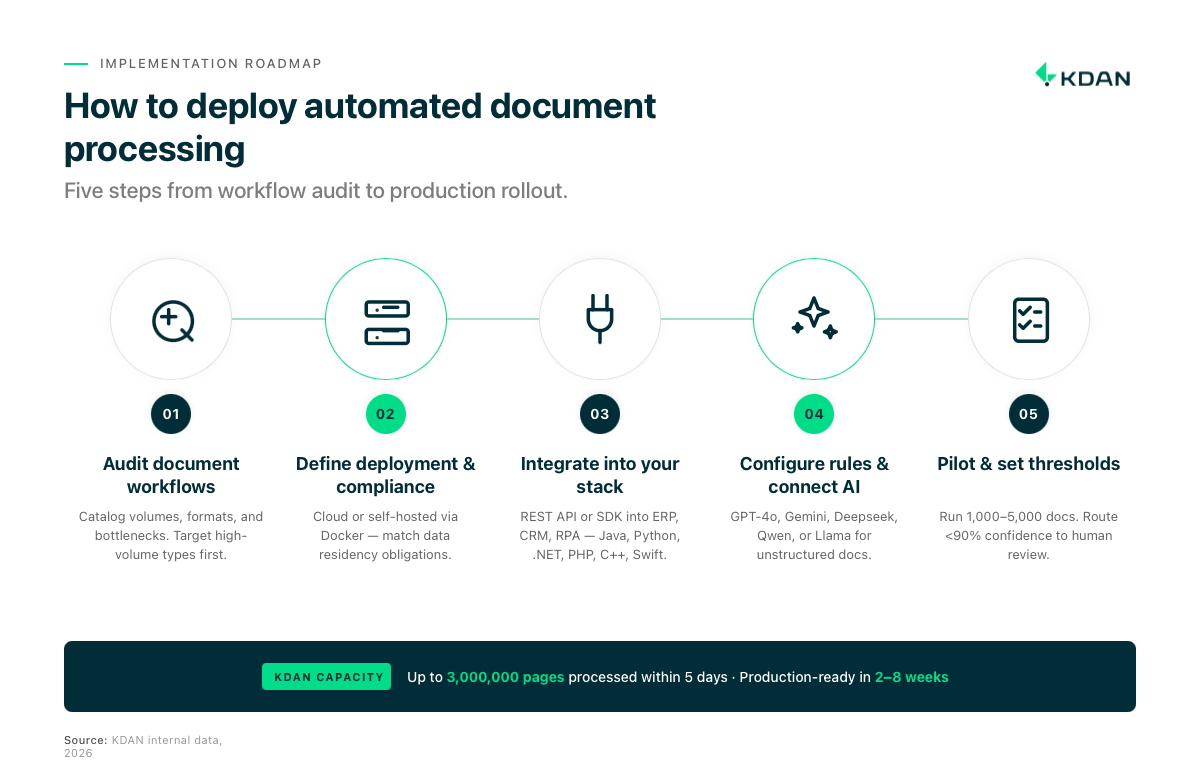
- Audit your existing document workflows. Catalog document types by volume, format, and processing complexity. Identify where manual data entry, re-keying errors, and approval bottlenecks consume the most staff time. High-volume, repetitive document types — invoices, purchase orders, onboarding forms — deliver the highest ROI for initial automation.
- Define your deployment and compliance requirements. Determine whether cloud or self-hosted deployment applies to your regulatory environment. ComPDF’s Docker-based self-hosted deployment can be provisioned within existing server environments without external cloud dependency. KDAN’s infrastructure supports processing of up to 3,000,000 pages within five days at full capacity. [KDAN internal data, 2026]
- Integrate the document processing engine into your stack. Connect ComPDF via REST API or native SDK into your ERP, CRM, or RPA platform. ComPDF supports development environments including Java, Python, .NET, PHP, C++, and Swift, minimizing re-engineering effort. Make, Zapier, and Microsoft Power Automate integrations are also available for teams preferring no-code orchestration alongside SDK integration.
- Configure extraction rules and connect your preferred AI model. Define field extraction schemas for each document type. For unstructured documents — contracts, correspondence, regulatory filings — connect ComPDF AI to GPT-4o or Gemini 1.5 Pro to apply semantic field identification. For structured layouts, rule-based extraction with OCR typically delivers sufficient accuracy without LLM overhead.
- Validate with a pilot batch and set exception thresholds. Before full production rollout, process a representative batch of 1,000–5,000 documents and measure extraction accuracy, field completeness, and exception volumes. Establish a human-in-the-loop (HITL) confidence threshold — typically documents scoring below 90% — to route for manual review before scaling.
How Much Does Automated Document Processing Cost?
Per-page or per-document pricing is common among cloud API services. It suits low-volume pilots but generates unpredictable costs at enterprise scale — particularly for organizations processing millions of pages per month.
Subscription pricing offers cost predictability through monthly or annual plans with bundled document quotas. Overage fees apply at the per-unit rate. This model is standard among no-code platforms and mid-market IDP vendors.
Perpetual licensing and technology licensing eliminate recurring usage fees after initial acquisition. ComPDF offers both models, reducing long-term TCO significantly for high-volume operations. Self-hosted deployment further removes data transfer costs and cloud vendor dependency. Organizations implementing document automation typically achieve payback within three to six months, with first-year ROI of 200–400%, driven primarily by reductions in manual processing labor.
Document Processing in Action: Two High-ROI Use Cases
AP Invoice Automation
Accounts payable invoice processing combines high transaction volume with well-defined data structure, making it one of the highest-ROI starting points for document automation. Common pain points include manual data entry across invoice batches, keying errors in line-item amounts, and approval delays caused by disconnected email routing.
ComPDF AI addresses this workflow by automatically extracting key invoice fields — vendor name, invoice number, line items, amounts, tax codes, and due dates — and mapping them to ERP systems such as SAP or Oracle via API. Exception handling routes low-confidence extractions to human reviewers, maintaining accuracy without removing oversight. Straight-through processing for high-confidence invoices eliminates re-keying entirely and feeds directly into downstream payment workflows.

Contract Approval and Signing Workflow
Manufacturing and procurement organizations manage multi-party contract approval cycles that traditionally require sequential sign-offs across departments — a process measured in weeks. When DottedSign is integrated into an automated approval workflow, contract routing, notifications, signing, and archiving are orchestrated within a single pipeline.
KDAN’s manufacturing deployments have demonstrated a 20× improvement in contract closure speed when DottedSign is connected to multi-level approval workflows. [KDAN internal data, 2026] Reduced cycle time compounds across a procurement calendar — fewer project delays, faster vendor onboarding, and lower contract risk exposure per quarter.
The two use cases reflect KDAN’s document lifecycle architecture: ComPDF handles extraction and structuring at the Integrate & Automate stage; DottedSign governs signing and archiving at the Agree & Govern stage — covering the full document processing pipeline without additional middleware.
Manage the full agreement lifecycle from extraction to legally binding signature. DottedSign →
When evaluating automated document processing solutions, confirm three criteria before committing to a vendor. First, verify that the deployment model — cloud or self-hosted — satisfies your organization’s data residency and compliance obligations. Second, confirm that the API or SDK integrates with your existing ERP, CRM, or RPA stack without requiring custom middleware. Third, assess whether the licensing model remains cost-predictable at your projected document volume over a three-year horizon.
FAQ
Automated document processing uses OCR, machine learning, and AI-based extraction to convert unstructured documents — invoices, contracts, and forms — into structured, machine-readable data. IDP systems apply natural language processing to understand document context and map extracted fields to downstream enterprise systems such as ERP or CRM platforms. The technology removes manual data entry from document-intensive workflows, reducing both error rates and processing time.
Traditional OCR converts scanned images into raw text but produces no understanding of what the text means or where specific data fields are located. IDP extends OCR by applying machine learning models to classify documents, identify named entities, extract targeted fields, and validate outputs against business rules. The distinction matters most for complex document types — contracts, medical records, customs declarations — where field positions vary and context determines meaning.
High-impact deployments occur in finance and procurement (invoice and purchase order processing), legal and contract management, healthcare and insurance (patient records and claims), logistics (bill of lading and customs documentation), and financial services (KYC and customer onboarding). These industries share high document volumes and regulatory requirements around data accuracy and auditability — two conditions that amplify the ROI of automation.
Accuracy varies by document type and configuration. For structured documents with consistent layouts, performance depends on OCR quality and the extraction model’s training data. For semi-structured and unstructured documents, LLM integration depth determines how well the system handles variable field positions and context-dependent meaning. Human-in-the-loop validation, applied to documents below a set confidence threshold, is standard practice in production deployments.
Security depends on the deployment model selected. Cloud API-based solutions require document data to be transmitted to and processed by the vendor’s infrastructure — a constraint for organizations under data residency regulations. Self-hosted deployment, such as ComPDF’s Docker-based option, keeps all document data within the organization’s own environment. At the application layer, enterprise-grade solutions apply role-based access control, AES-256 encryption, dynamic watermarking, and full audit logging.
No-code tools can be configured in days for simple workflows. SDK and API-based platforms such as ComPDF typically reach production within two to eight weeks when integrating with an existing ERP or CRM, depending on document type complexity and internal IT capacity. Legacy IDP platform deployments typically require three to six months due to platform configuration and organizational change management requirements.
Enterprise document automation deployments typically achieve payback within three to six months, with first-year ROI of 200 to 400 percent, driven by reductions in manual processing labor. The largest gains come from eliminating re-keying errors, shortening approval cycle times, and enabling straight-through processing for high-confidence documents. ROI is highest where document volume is greatest — AP invoice processing, HR onboarding, and contract management consistently rank among the top use cases by return magnitude.
Ready to Automate Your Document Workflows?
